
You know you can do the job. Your CV has to prove it to someone skimming for thirty seconds.
Most CVs that get passed over aren't short of experience. They list duties instead of results, bury the most relevant role, or use a layout that screening software can't read. All of that is fixable, and none of it is about how good you are.
This guide walks through TuConnect's CV Builder one section at a time, following a single CV from a blank page to a finished PDF. At each step you'll see what to write, why it matters to a Kenyan recruiter, and where the builder does the work for you.
About the example
Faith Wanjiru Mwangi is a fictional supply chain manager in Nairobi, created for this guide. Her employers and results are illustrative. Your own CV should only include figures you can explain in an interview.
Before you start
Building a CV takes about 15 minutes if you have these ready:
- The job advert you're aiming at, or one that is typical of the roles you want
- Your job titles, employers, and the month and year you started and left each role
- Two to four results for each recent role, with numbers where you have them
- Your qualifications and any professional certifications, with dates
- Your LinkedIn profile link
The advert matters most. Every decision below, from your headline to your skills, is easier when you know what the employer is asking for.
Step 1: Start a new CV and choose a template
Open the CV Builder and start a new CV. You'll be asked how you want to build it:
- Step-by-Step takes you through each section yourself. It takes about 15 minutes and gives you the most control.
- AI Autocreate generates a complete first draft in about 30 seconds. It's fast, but read every line before you use it, because a draft only knows what you've told it.
You can switch methods at any time. This guide follows Step-by-Step, because it shows what each section is for.
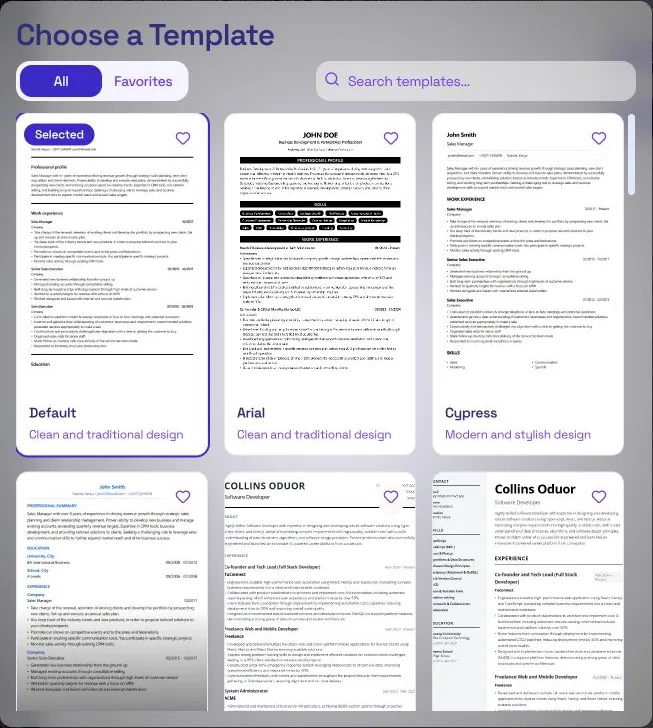
Next, pick a template and choose a single-column layout. Two columns, sidebars, skill bars and photos can look polished, but applicant tracking systems (ATS), the software many employers use to screen applications, often read them out of order or skip parts entirely. Faith uses the Default template.
What it costs
Your first CV is free. Each additional CV uses 25 credits, and downloading your CV is always included. See how credits work.
Step 2: Fill in your header
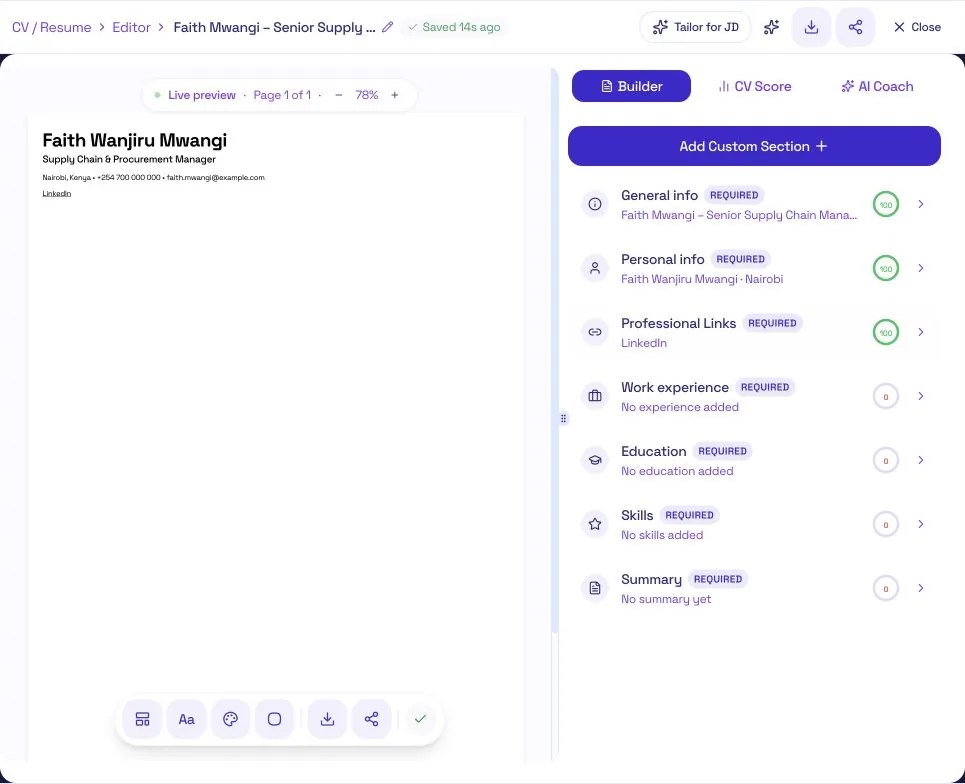
The builder splits your header into three short sections: General info, Personal info and Professional Links. Each section shows a completion score, so you can see at a glance what's still missing.
Your header needs:
- Your full name, as it appears on your certificates
- A headline that matches the job you want. Faith's is "Supply Chain & Procurement Manager".
- A professional email address and a phone number in +254 format
- Your town or city. A full street address isn't needed.
- Your LinkedIn link, if your profile is up to date
Leave out your photo, date of birth, ID number, KRA PIN, marital status and religion. None of them help you get shortlisted, and your ID number and KRA PIN don't belong on a document you send to people you've never met.
Step 3: Write a summary that makes your case
Your summary is the first thing a recruiter reads. In three or four lines, it should answer three questions:
- What do you do professionally?
- What are you best at?
- What proof do you have?
Lead with whatever is most relevant to the job you're applying for, and include at least one result.
Faith's summary
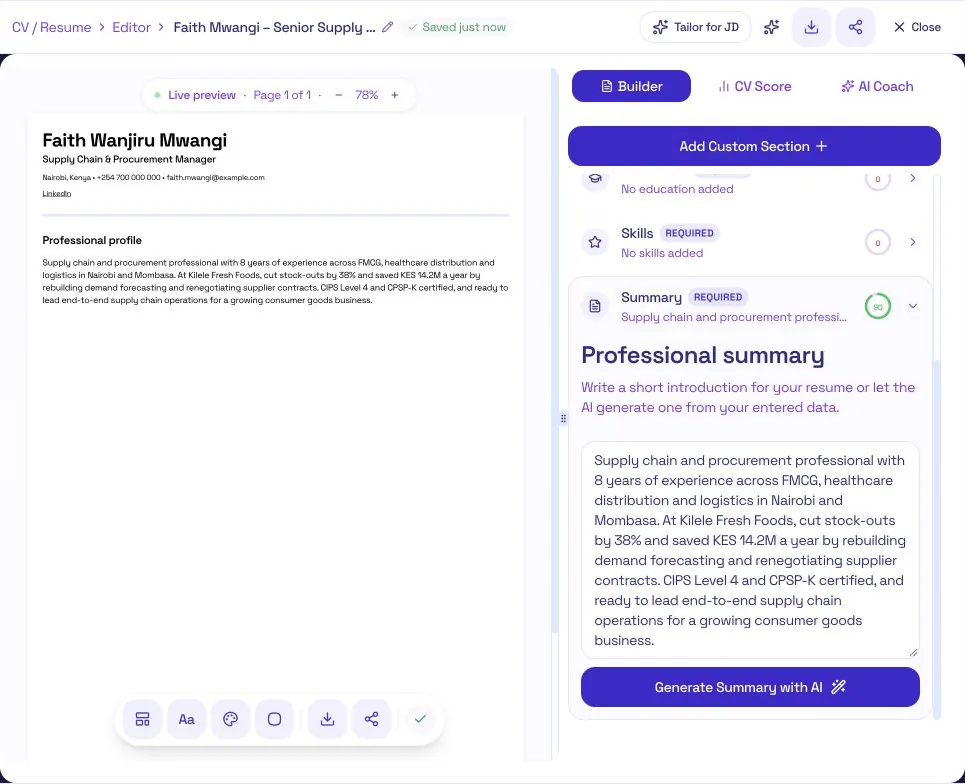
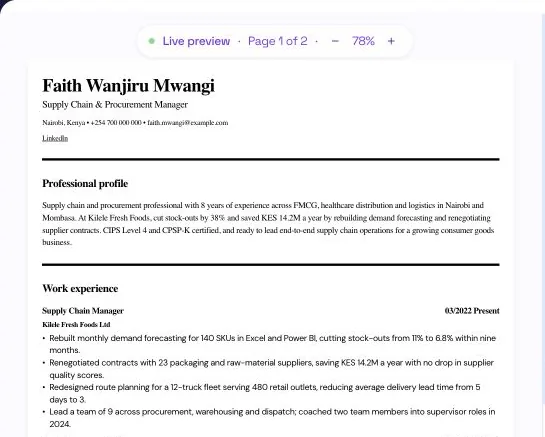
Supply chain and procurement professional with 8 years of experience across FMCG, healthcare distribution and logistics in Nairobi and Mombasa. At Kilele Fresh Foods, cut stock-outs by 38% and saved KES 14.2M a year by rebuilding demand forecasting and renegotiating supplier contracts. CIPS Level 4 and CPSP-K certified, and ready to lead end-to-end supply chain operations for a growing consumer goods business.
The Summary section has a Generate Summary with AI button, which writes a draft from what you've already entered. If you use it:
- Fill in your work experience first. The AI can only draw on what's in your CV, so a summary written after your experience section is far more specific.
- Edit the draft. Check every number, cut phrases that could describe anyone, like "results-driven" or "team player", and make sure it sounds like you.
Step 4: Turn your work experience into evidence
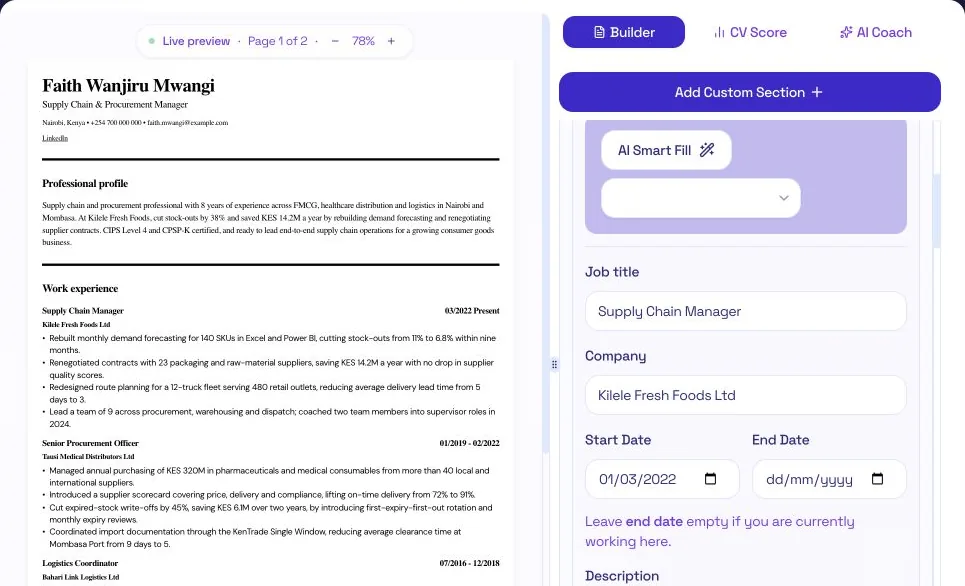
List your roles with the most recent first. For each one, add your job title, the company, and your start and end dates. For your current job, leave the end date empty and the builder shows it as "Present".
Then write your bullet points. This is where most CVs lose the reader, because they describe the job instead of what you achieved in it. Use this structure: action verb + what you did + the result.
Before
Responsible for demand forecasting and supplier management.
After
Rebuilt monthly demand forecasting for 140 SKUs in Excel and Power BI, cutting stock-outs from 11% to 6.8% within nine months.
The second version shows the scale of the work, the tools used and what changed as a result. A recruiter can picture Faith doing it.
- Write three or four bullets for recent roles, and two or three for older ones.
- Only use numbers you can explain in an interview. Savings in KES, time saved, error rates and team size all work. Never invent a figure.
- No number? Describe what changed. "Introduced a supplier scorecard that became the basis for contract renewals" still shows impact.
AI Smart Fill sits at the top of each role and can suggest wording. As with the summary, treat it as a starting point and check each line against what you actually did.
Not sure your bullets are strong enough? Our Kenyan CV Guide has more before-and-after examples and a list of action verbs.
Step 5: Add education and certifications
Add your degree or diploma with the institution's full name and your start and end dates.
Professional certifications carry real weight with Kenyan employers, especially in finance, procurement, HR and IT. To add them, use Add Custom Section and create a Certifications section. Faith lists her CIPS Level 4 Diploma and her CPSP-K certification from the Kenya Institute of Supplies Management.
Custom sections also work for languages, referees or volunteering. Only add one if it strengthens your application for this job.
Step 6: Choose skills that match the job
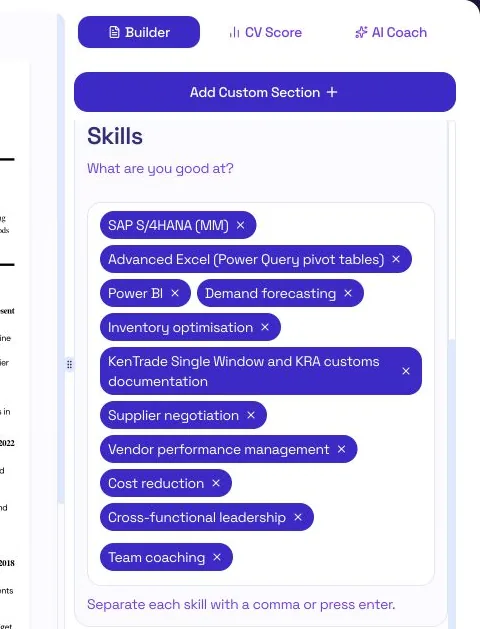
Type each skill and press Enter, or separate skills with commas. Each one becomes a tag.
Pick the skills the advert asks for that your experience can prove. When Faith added eleven skills, the builder suggested trimming the list to eight. A short, relevant list is easier for both screening software and recruiters to match against the advert.
One thing to watch: because commas separate skills, "Excel (Power Query, pivot tables)" becomes two broken tags. Write "Advanced Excel" instead, and show the detail in a work experience bullet.
Step 7: Check your CV Score and tailor it to the job
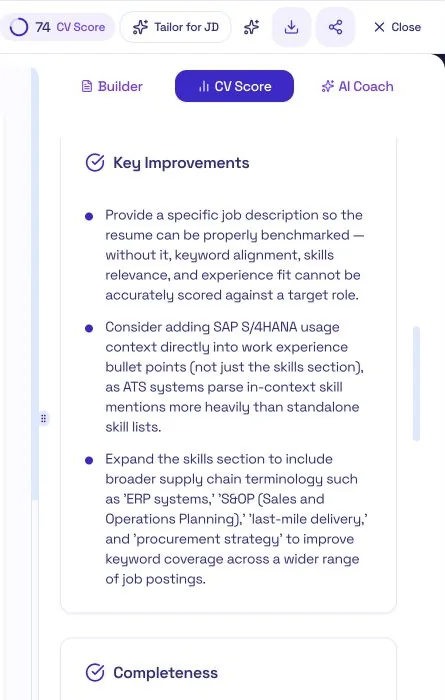
Open the CV Score tab to see your score and a list of Key Improvements. The suggestions are specific: what's missing, what to strengthen, and how screening software is likely to read your CV.
Faith's first score was 74. Her top suggestion was to add the job description she was applying for, because without one the builder can't measure how well her CV fits a specific role.
That's what Tailor for JD, at the top of the editor, is for. Add the job description for each application that matters. You're not rewriting your CV every time. You're reordering what's already true so the most relevant parts come first. Sending one CV to every employer is one of the most common reasons capable candidates don't get interviews.
Step 8: Preview, proofread and download
The Live preview beside the editor shows your CV as it will download, with a page counter at the top.
Aim for one page if you have less than three years of experience, and two pages beyond that. Faith has eight years of experience, and her CV fits on two.
Before you download, read the preview once as if you were the recruiter, not the form you filled in. Then download your CV as a PDF from the toolbar. Downloading is always included, with no extra credits.
Building your CV on your phone
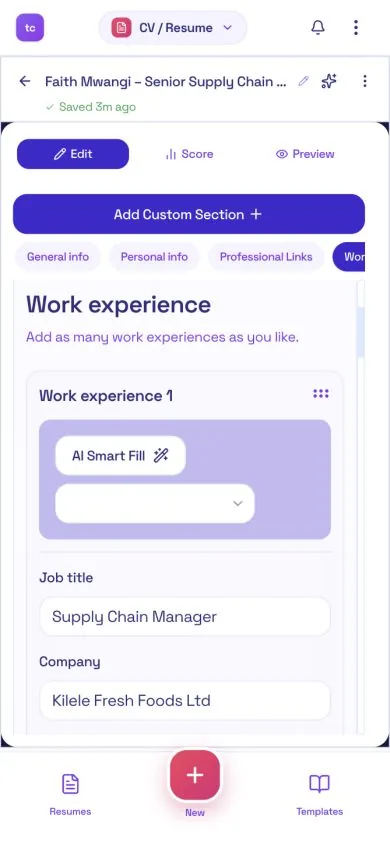
The CV Builder works on your phone too. On a small screen, the editor, score and preview become three tabs: Edit, Score and Preview. Shortcuts across the top let you jump straight to the section you're working on.
Final check before you apply
- A recruiter can tell which job you want within five seconds
- Each recent role shows what changed because of your work
- Every date, company name, link and number is accurate
- The skills the advert asks for are easy to find
- Your CV is two pages or fewer, with no personal details you don't need to share
- You've proofread the preview, not just the form
Common questions
Is the TuConnect CV Builder free?
Your first CV is free. Each additional CV uses 25 credits, and downloading is always included, so you never pay to download a CV you have already created. There is no subscription and nothing renews automatically.
How long does it take to build a CV on TuConnect?
About 15 minutes with Step-by-Step, if you have your dates, results and the job advert ready. AI Autocreate produces a first draft in around 30 seconds, but allow time to check and edit it before you apply.
Should I use AI Autocreate or Step-by-Step?
Use Step-by-Step if this is your first CV or you are changing careers, because deciding what goes in each section is where most of the value is. Use AI Autocreate if you are short on time, then edit the draft line by line. You can switch methods at any time.
Will a CV made with TuConnect pass applicant tracking systems?
No tool can guarantee that a CV passes every system. What reliably breaks screening software is well known: multiple columns, text inside images, contact details in the page header and unusual section headings. TuConnect's single-column templates avoid those, and the CV Score tab flags content problems before you apply.
Should my CV be one page or two?
One page if you have less than three years of experience, two pages beyond that. In Kenya the document is usually called a CV, but it should be as concise as what other countries call a resume.
Can I build my CV on my phone?
Yes. The CV Builder works in your phone's browser, with separate Edit, Score and Preview tabs so each part fits the screen.
Your next step
Every application you send with a CV that hides your results is one that a less qualified candidate can win. A clear CV won't guarantee the job, but it makes sure the right people see what you can do.
Build yours one section at a time, tailor it for the roles that matter, and let the score tell you what to fix next.